Viewing Invoices
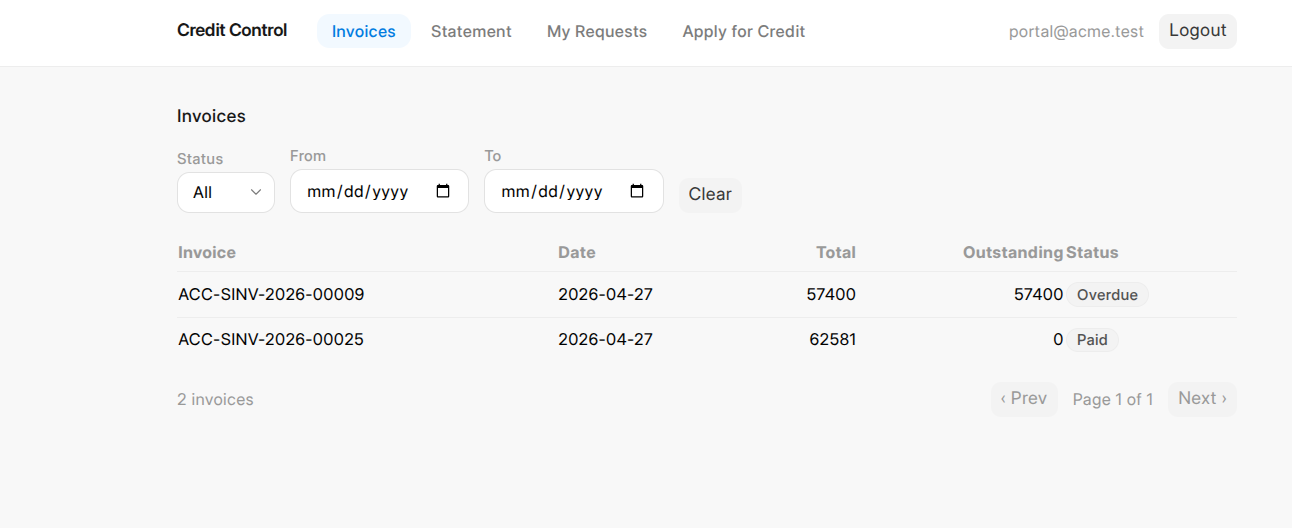
When a customer signs in, the first thing they see is their Invoices list — every invoice on their account, so they always know what they owe without asking.
What the list shows
Each invoice row shows the invoice number, the date, the total amount, the outstanding balance, and the status (Unpaid, Overdue, or Paid). This is the customer's own copy of exactly what the credit team sees for them.
Finding a specific invoice
Customers can narrow the list using the filters at the top:
- Status — show only Unpaid, Overdue, or Paid invoices
- Date range — a From and To date to focus on a particular period
The list is paged, so customers with many invoices can move through them without one huge scroll.
Last updated 2 months ago
Was this helpful?